Digital Paper Back to School: Simplifying Your Classroom and Creative Projects
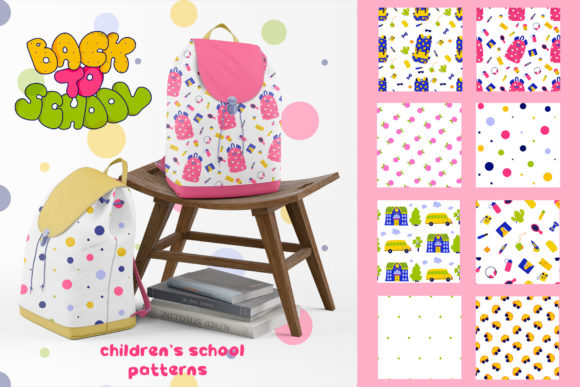
Getting ready for a new school year often means juggling countless tasks—designing classroom materials, organizing presentations, creating engaging worksheets, or updating a blog with fresh seasonal content. The pressure to produce polished, cohesive visuals can be overwhelming, especially when you’re short on time. That’s where Digital Paper Back to School comes in. This resource offers a ready-to-use collection of patterns that transform your workflow, whether you’re a teacher, a parent, a content creator, or a small business owner. With a thoughtfully designed set of eight patterns available in 100 vector files, this package is built for easy customization and immediate application across blogs, websites, applications, presentations, and more.
What Is Digital Paper Back to School?
At its core, this digital paper bundle provides a library of high-quality background designs tailored for back-to-school themes. The collection includes eight distinct patterns—cute, playful, and professional—that evoke the excitement and organization of a new academic year. Each pattern is delivered in multiple vector formats (AI, EPS, SVG PNG), ensuring compatibility with nearly any design tool or platform. But more than just a set of images, Digital Paper Back to School is a practical toolkit. It saves you from starting from scratch, gives you a consistent aesthetic across projects, and allows you to focus on the message rather than the design mechanics.
Common Challenges When Preparing Back-to-School Materials
Whether you’re creating resources for a classroom, a teacher’s blog, or a school-related product line, several obstacles tend to arise.
- Time constraints: With lesson planning, curriculum updates, and other responsibilities, designing visuals from zero is rarely a priority.
- Inconsistent branding: Mixing different clip art or backgrounds can result in a disjointed look that confuses your audience.
- Format limitations: Many free resources don’t offer scalable vectors, leaving you with pixelated images when you resize them.
- Lack of cohesive themes: Finding patterns that all work together under one theme (like “back to school”) without clashing takes considerable effort.
- Limited customization: Pre-made designs often can’t be tweaked easily, forcing you to accept colors or layouts that don’t quite fit your project.
Digital Paper Back to School directly addresses each of these pain points by offering a ready-made, customizable solution that streamlines the creative process.
How This Collection Solves Real Problems
Imagine you’re a teacher preparing a welcome presentation for parents. You need slides that look friendly and organized without spending hours in design software. With the Digital Paper Back to School bundle, you can select a pattern that suits each slide—maybe a chalkboard texture for the title, notebook paper for the agenda, and a playful dotted grid for a “classroom rules” page. Because the files are vectors, you resize them without losing quality, and you can recolor elements to match your school’s colors thanks to the easy customizability built into the AI and EPS files.
For a blogger writing a series on “back-to-school organization,” the collection offers backgrounds for social media graphics, featured images, and “pin” templates. The eight patterns give variety while maintaining a unified theme, so your content feels connected. If you run a small online shop selling printable planners, these patterns can become the base for covers, dividers, and stickers—saving you the effort of designing each piece individually. The PNG files are immediately usable for web uploads, while SVG and AI files let you dive deeper into edits.
Educators and School Staff
Teachers can use these patterns in morning meeting slides, bulletin board backdrops, homework sheets, and newsletters. Because the patterns are cute yet not childish, they work for elementary through middle school. You can print them as physical paper for classroom displays, or use them digitally in Google Slides and Powerpoint. The versatility means less time designing and more time teaching.
Content Creators and Bloggers
A back-to-school blog post needs captivating visuals. Use a pattern as a header background, or layer text over a subtle pattern for a quote card. Bloggers in the education niche often require attention-grabbing Pinterest images—these patterns help you stand out in crowded feeds. The collection’s 100 vector files give you enough variety to produce a month’s worth of content without repetition.
Small Business Owners and Designers
If you create products for teachers or parents (like printable certificates, reward charts, or lesson planners), this bundle is a cost-effective way to add professional-grade backgrounds. The AI and EPS formats allow commercial users to modify and resell derivative products, provided you follow the license terms. Customization is straightforward: adjust colors, scale elements, and combine patterns to create unique compositions.
Parents and Organizers
Even if you’re not a professional, you can use these patterns to make your child’s homework more engaging, design a chore chart, or personalize a school binder. The simple PNG files can be inserted into Word documents or Canva for quick results.
Key Considerations When Choosing a Digital Paper Bundle
Not all pattern sets are built equally. Here are a few factors to weigh when deciding if Digital Paper Back to School is right for your project.
- Scalability: Because this collection supplies vectors, you can blow up a pattern to poster size without pixelation. Raster-only packs would force you to buy larger versions separately.
- File compatibility: The inclusion of AI, EPS, SVG, and PNG means you can work in Adobe Illustrator, Affinity, Inkscape, or even PowerPoint. This cross-platform support reduces friction.
- Pattern variety: With eight distinct pattern styles, you have enough diversity to avoid monotony but not so many that you feel overwhelmed. Each pattern is carefully aligned to the back-to-school theme—look for elements like pencils, apples, stars, grids, and school buses woven into the designs.
- Customization ease: The “easy customizable” promise is backed by organized layers in the vector files. You can change colors, delete elements, or combine patterns without needing advanced design skills.
- Usage rights: Always check the license. Typically, such bundles allow both personal and commercial use (with restrictions on reselling the raw files). This pack is designed to be flexible for your applications.
Recommendations for Getting the Most Out of Your Digital Paper
To maximize the value of your Digital Paper Back to School bundle, consider these practical tips.
- Organize your files by format and pattern. Create a folder for each pattern and keep the AI, EPS, SVG, and PNG versions together. This makes it easy to grab the right format later.
- Create a master palette. Before starting a project, pick two or three patterns that will serve as your base. Use one for backgrounds, another for accents, and maybe a third for text highlights. Consistent use reinforces your brand or theme.
- Experiment with transparency and overlay. In design software, adjust the opacity of a pattern to create a subtle watermark effect. This works great for featured images where you want texture without distracting from text.
- Combine patterns with your own photos. Place a pattern behind a photo of a classroom or school supplies to tie the visual together. The uniformity of the digital paper gives a polished look.
- Use patterns in non-traditional ways. Don’t limit them to backgrounds. Try using a pattern as a border, a fill for icons, or a wrapping paper for virtual gifts. The flexibility is there.
Outcomes and Benefits You Can Expect
Adopting a comprehensive digital paper solution like this one brings tangible improvements. You’ll cut down design time by 50–70% because you’re not creating backgrounds from scratch each time. Your projects will gain a consistent, professional appearance that builds trust with your audience—whether that’s parents reading a classroom newsletter or shoppers browsing your product listings. The vector formats future-proof your content; you can reuse these patterns years later without worrying about resolution upgrades. Moreover, the cuteness factor adds warmth and approachability, making educational content more inviting.
Different Approaches for Different Goals
Depending on your primary need, you might use the collection differently.
- For speed: Stick with the PNG files and drop them directly into your documents or slide decks. No editing required—just place and resize.
- For branding consistency: Open the AI files and adjust the color palette to match your existing brand guidelines. Then export your customized versions as PNGs for repeated use.
- For creativity: Mix elements from different patterns within the bundle. For instance, take an apple icon from one pattern and place it over a lined paper background from another. The vector files make this blending simple.
- For commercial products: Use the EPS format if you’re working with industrial printing services that require that standard. The scalable vector ensures crisp results on promotional items like tote bags or banners.
Final Thoughts: A Resource Worth Adding to Your Toolkit
Back-to-school season doesn’t have to be a scramble for visuals that fall short. Digital Paper Back to School equips you with a cohesive, customizable collection that adapts to your workflow. The eight patterns, delivered across 100 vector files, cover the essentials: cute notebooks, playful polka dots, chalkboard textures, crayon marks, and more. Whether you’re preparing a single presentation or building an entire product line, this bundle reduces friction and elevates your output. By focusing on solutions rather than features, it meets the real needs of adults who want to save time, maintain quality, and deliver engaging content. Explore the patterns, experiment with customization, and see how a simple set of digital papers can transform your back-to-school projects.