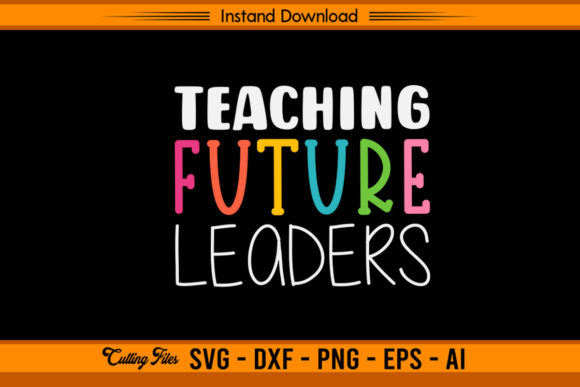
Teaching Future Leaders Back to School Designs
What Makes This Collection Stand Out
The Teaching Future Leaders – Back to School set brings together clean typography, thoughtful motifs, and a message that resonates with educators, parents, and students alike. Unlike generic school-themed graphics, this collection centers on the idea that every classroom interaction shapes tomorrow. The artwork balances warmth with professionalism, making it suitable for both casual projects and branded merchandise.
Each file in the bundle has been prepared for instant use with cutting machines such as Cricut or Silhouette. The zip folder contains an SVG, AI, EPS, PNG, and DXF file, giving you flexibility across software and hardware. Whether you prefer editing vectors in Illustrator, cutting vinyl with a machine, or printing directly onto fabric, one of these formats will match your workflow. There is no physical product — you download immediately after purchase and begin creating right away.
Classroom Teachers and School Staff
If you are an educator looking to personalize your space or your wardrobe, these designs offer a straightforward way to show pride in your profession. Use the SVG to cut iron-on vinyl for a tote bag that carries your daily materials. Apply the same graphic to a notebook cover or a mug that sits on your desk. Because the artwork emphasizes the long-term impact of teaching, it aligns well with the mission-driven atmosphere many schools cultivate at the start of the year.
You can also resize the design to fit name tags, classroom banners, or bulletin board headers. The PNG version works well for printing on sticker paper, which you can then cut by hand or with a machine. Create small labels that read Future Leader in Training and attach them to student cubbies or folders — a small gesture that reinforces positive identity throughout the term.
Small Business Owners and Etsy Sellers
For those running a print-on-demand shop or handmade goods store, this collection gives you a ready-to-use asset that requires minimal preparation. The layered SVG is especially helpful for creating multi-color decals and heat transfers. Since the design features a clear focal message, it works on apparel like t-shirts, hoodies, and caps. You can also experiment with placement — center chest, left chest, or even a small version on the sleeve.
Phone cases, tote bags, and throw pillows are other product categories that benefit from this style. Because the illustration is provided at high resolution, you can scale it for larger items without losing detail. No watermark appears on the downloaded files, so you can present a professional product to your customers from the first listing.
Hobbyists and DIY Enthusiasts
If you enjoy crafting for personal use or gift-giving, this set removes the guesswork from design. Open the DXF file in your cutting machine software, adjust the size to fit your blank, and let the machine do the rest. The files work with both Cricut Design Space and Silhouette Studio, so you do not need advanced vector skills to produce a clean result.
Consider making a set of matching items for a teacher friend: a mug, a keychain, and a card featuring the same graphic. Because the design is consistent across formats, you can produce a coordinated gift that looks intentional and polished. The PNG file also lets you print onto cardstock for scrapbook pages or classroom decorations.
Color Variations and Material Choices
The original artwork works well as-is, but you can easily adjust the colors to match a specific school palette or brand identity. Open the AI or EPS file in Adobe Illustrator, select individual elements, and apply your own swatches. If you prefer working with the SVG, many free editors like Inkscape or Gravit Designer allow similar edits. Keep in mind that contrast matters — lighter colors on dark backgrounds and vice versa will make the text and icons stand out.
Material choice also affects the final look. For apparel, use stretchable heat transfer vinyl designed for fabric. For hard surfaces like mugs or phone cases, choose permanent adhesive vinyl. The PNG file can be printed on transfer paper for ceramic or metal items. Testing a small sample before committing to a production run saves time and material.
Sizing and Placement Tips
One advantage of vector files is that you can resize without losing quality. For t-shirts, a design that spans roughly 10 to 12 inches wide works well for adults, while children's sizes call for 7 to 9 inches. On a standard 11-ounce mug, keep the graphic between 3 and 4 inches tall so it wraps comfortably around the curved surface. For phone cases, measure the actual blank — some cases have raised edges that require a slightly smaller design to avoid distortion.
When cutting with a machine, always perform a test cut on a small piece of material to confirm blade pressure and depth. This step is especially important for layered designs where multiple colors need to align. Use weeding tools to remove excess vinyl carefully, and apply transfer tape at a 45-degree angle to reduce air bubbles.
File Format Breakdown
Knowing which format to use for each task saves time and frustration. The SVG is ideal for Cricut and Silhouette users because it preserves paths and layers. The AI file works natively in Adobe Illustrator and allows deeper editing of shapes and colors. The EPS format is a vector fallback that opens in many design programs, including older versions. The PNG provides a raster version with a transparent background, perfect for printing or quick previews. The DXF is another vector option that some cutting machines prefer for certain operations.
Store all files in a single project folder after unzipping. Rename them with descriptive titles if you plan to use variations — for example, Teaching_Future_Leaders_SVG — so you can locate the right version quickly during a busy production session.
Ensuring Print and Cut Accuracy
Before sending any design to a cutting machine, check that the document dimensions match your material size. If your software asks for a registration mark for Print Then Cut, make sure your PNG has a transparent background and clear boundaries. For layered vinyl projects, assign each color to a separate line in the design software and cut them sequentially. Label each layer to avoid mixing pieces during assembly.
When pressing heat transfer vinyl onto fabric, follow the temperature and time guidelines for your specific brand. Most materials require medium heat (around 300°F to 320°F) and firm pressure for 10 to 15 seconds. Peel warm or cold depending on the vinyl type — some release better when warm, others need to cool completely. Testing a small patch first prevents damage to both the garment and the design.
Why This Bundle Suits the Back-to-School Season
The start of a school year is a moment of renewal, and visuals that capture that spirit connect with people on an emotional level. Teachers want to feel appreciated. Students want to feel valued. Parents want to support both. The Teaching Future Leaders – Back to School graphics tap into that shared energy without relying on clichés like apples or chalkboards. Instead, the design focuses on the relationship between teaching and leadership, which feels relevant and forward-looking.
From a practical standpoint, the bundle arrives at a time when many creators are preparing content for September. Bloggers can use the PNG as a featured image for posts about classroom management or teacher appreciation. Social media managers can pair the graphic with quotes about mentorship and share it across platforms. The consistent visual identity helps build recognition, especially if you use the same design across your website, store, and print materials.
Final Recommendations for Getting the Most Out of the Files
Before you start a large project, open each file type on your computer to confirm compatibility. If you encounter any issues, check that your software supports the format version — most modern programs handle SVG and EPS without trouble, but older versions of some applications may need updates. The PNG is your safest fallback because it works everywhere and requires no special software.
For those new to cutting machines, start with a simple single-color project using the SVG or DXF. Once you feel comfortable weeding and transferring vinyl, experiment with multi-color layers. The design elements in this set respond well to color separation, and you can create depth by using contrasting shades for the text and icon areas.
Finally, consider pairing this design with other back-to-school resources from the same shop. Coordinating graphics, fonts, and motifs make it easier to build a cohesive product line. Whether you plan to sell finished goods or use the designs for personal projects, the files give you a solid foundation that saves time and delivers professional results.