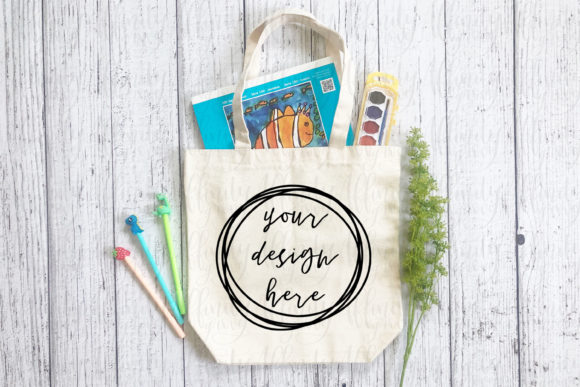
Back to School Tote Bag Mockup Flatlay
When the back-to-school season rolls around, every designer, small business owner, and content creator feels the same quiet pressure: how do you present your work in a way that feels fresh, professional, and ready for the moment? A Back to School Tote Bag Mockup Flatlay is one of the smartest tools you can add to your creative workflow. It lets you show off your designs on a realistic tote bag without producing a single physical sample. That means you can test ideas, launch products, or create marketing visuals in a fraction of the time and cost.
This mockup is a high-resolution JPG image (4032 × 3024 pixels) that places a tote bag in a carefully composed flatlay arrangement. The flatlay perspective gives viewers a straight-down, organized view of the bag alongside subtle props or negative space, making it easy to insert your own artwork. Whether you design for teachers, students, parents, or school-themed shops, this format helps you communicate your ideas clearly and beautifully.
Why a Mockup Flatlay Works So Well for Back-to-School Projects
Flatlays have become a visual language of their own. They feel curated, intentional, and easy to scan. When you combine that with a tote bag—a universally recognized back-to-school essential—you get a canvas that resonates with a wide audience. Tote bags carry books, lunches, art supplies, and laptops. They are practical, personal, and often a way for students and teachers to express personality. Showing your design on a tote bag flatlay instantly connects that design to real-life use.
What makes this particular mockup interesting is the way it balances realism with flexibility. The lighting is even, the shadows are soft, and the composition leaves room for your artwork to take center stage. You are not fighting with a busy background or awkward angles. Instead, you get a clean, professional base that works for everything from social media posts to product catalog pages.
Creative Possibilities You Can Explore
Once you have the mockup file, the creative directions are surprisingly broad. Here are several approaches that different makers and sellers can pursue.
Personalized Name Bags
One of the most popular back-to-school trends is customized gear. Parents and students love seeing their name or initials on a bag. You can design monograms, script names, or playful lettering and place them on the mockup. This gives you a quick way to preview how the final product will look without printing a single bag. If you run an Etsy shop or a print-on-demand store, you can use the mockup to create listing images for multiple name variations.
Subject-Specific Motifs
Think about the different subjects students carry with them. A tote bag could feature science graphics, math symbols, literature quotes, or art-inspired patterns. You can create a small collection of designs—one for each major subject—and use the same mockup to present them as a series. Keeping the mockup consistent across the set helps buyers see the full range of your offerings at a glance.
School Spirit and Mascot Themes
Teachers, club leaders, and PTA volunteers often look for ways to build school pride. A tote bag featuring a mascot silhouette, school colors, or a motivational phrase can be a hit. Using the flatlay mockup, you can tweak colors and typography to match a specific school palette and share the preview with decision-makers before committing to production. This is especially useful for fundraising campaigns or spirit week promotions.
Teacher Appreciation and Classroom Organizers
Not every back-to-school bag is for students. Teachers also carry totes loaded with papers, supplies, and personal items. Designs aimed at educators—"World's Okayest Teacher," "Lesson Plan Queen," or simple floral patterns—have a strong audience. The flatlay format allows you to pair the bag with small props like pencils, sticky notes, or an apple (real or in the design itself) to reinforce the teacher theme.
Minimalist Monochrome Styles
Sometimes the most effective designs are the simplest. A clean, geometric pattern or a single bold word can feel modern and sophisticated. The flatlay mockup handles minimal artwork well because the open composition does not compete with the design. You can experiment with black-on-cream, white-on-khaki, or soft pastel tones to create a calm, elevated look that appeals to older students and parents who prefer understated style.
Adapting the Mockup for Different Users and Platforms
Different creators will use this mockup in different ways. Here is how various people in your audience might adapt it for their own goals.
Etsy sellers and small shop owners can use the mockup as the primary image for product listings. A flatlay photo performs well on marketplace search results because it fills the frame cleanly and draws the eye. You can also use it for social media posts that link back to your shop. Because the mockup is a single JPG, you can quickly produce a set of images that show your design from multiple angles simply by repeating the process with slight variations in placement.
Bloggers and content creators writing about back-to-school style, organization, or DIY gift ideas can embed the mockup into their articles. It adds visual credibility and helps readers imagine the product in real life. Pair the image with a short story about how you created the design, and your post becomes both informative and relatable.
Graphic designers and illustrators can use the mockup in their portfolios. Instead of showing a flat digital file, you show the design on a tangible object. That small shift makes your portfolio feel more complete and professional. It also tells potential clients that you understand how your work translates to physical products.
Educators and school administrators can use the mockup to preview custom orders for school events. If you are coordinating a fundraiser or a welcome week package, a clear visual helps vendors and volunteers align on the final design before anything goes to print.
How to Use the Mockup: A Practical Walkthrough
The process is straightforward, and you do not need expensive software to get good results. Start by downloading the JPG file from Creative Fabrica after your purchase. The image is 4032 × 3024 pixels, which gives you plenty of resolution for print-quality previews and large social media graphics.
If you use Adobe Photoshop, open the mockup file, place your design as a new layer, and adjust the scale and rotation to match the bag area. Use a layer mask or clipping mask if needed to keep your artwork confined to the bag surface. Then adjust the blend mode or opacity so the shading and folds of the original bag show through, giving your design a realistic printed look.
If you prefer free tools, Canva and Stencil both support image overlay. Upload the mockup as your background, then upload your design as a PNG with a transparent background. Resize and position your artwork over the tote bag area. You can also adjust transparency and add shadows manually if the tool supports it. The key is to make sure your design aligns with the bag's perspective and does not spill over onto the background.
Other free photo editors like Photopea or GIMP work similarly and offer layer-based editing at no cost. The important thing is to understand the basic concept: your design goes on top of the mockup, and you adjust it to sit naturally within the flatlay scene.
Once you are happy with the placement, save your file as a JPG or PNG depending on your intended use. For Etsy listings, a square crop often works best. For Instagram, portrait or square ratios both perform well. For blog posts, a horizontal crop can break up text nicely.
Keeping Your Results Clear, Consistent, and Audience-Friendly
A mockup is only as effective as the design you put into it. To get the best results, start with artwork that is appropriately sized for the bag area. If your design is too small, it will look lost. If it is too large, it may wrap awkwardly around edges. Test different scales before settling on a final version.
Pay attention to color contrast. A light design on a light bag will be hard to read. Similarly, dark on dark can disappear. If the mockup shows a neutral-toned bag (common in flatlay setups), adjust your design's brightness and saturation so it remains visible and punchy.
Consistency matters when using the same mockup across multiple designs. Keep your placement and scale similar so that your product line looks cohesive. Customers scrolling through your shop will recognize the format and associate it with your brand. If you change the bag angle or prop arrangement too often, the collection can feel disjointed.
Also consider the audience for each design. A tote aimed at elementary school children might use bright colors, bold fonts, and playful characters. A tote for college students might lean into minimalist typography, abstract patterns, or witty one-liners. The mockup itself stays neutral, letting your design speak directly to the right buyer.
Practical Inspiration to Get Started
If you are looking for a place to begin, try designing three variations on a single theme. For example, create a "school supplies" pattern featuring pencils, rulers, and notebooks scattered across the bag in a repeating print. Then make a version with just a central pencil icon and a phrase like "Sharp Minds." Finally, create a purely typographic version with the word "STUDY" in a bold sans-serif font. Place all three on the same mockup and compare how each reads. This exercise will help you see which style resonates most with your audience before you invest in producing physical inventory.
Another idea: use the mockup to build a seasonal social media campaign. Post one new design every day for the week leading up to back to school. Each post uses the same flatlay layout but features different artwork. Followers will start to recognize the format and look forward to the next reveal. At the end of the week, direct them to your shop where all the designs are available. This kind of consistent visual storytelling builds anticipation and trust.
The Real Value of a Digital Mockup
Working with a mockup removes the friction between an idea and a presentation. You do not need to source a physical bag, set up a photo studio, or worry about lighting inconsistencies across different shots. You get one clean, high-quality image that you can use again and again. Over time, that efficiency saves hours and lets you focus on what matters most: designing products that people actually want to carry.
This Back to School Tote Bag Mockup Flatlay gives you a reliable foundation. Whether you are a seasoned shop owner, a teacher preparing classroom materials, or a designer testing new concepts, the mockup adapts to your workflow. It respects your time, showcases your work honestly, and helps you connect with the people who will carry your designs into classrooms, libraries, and coffee shops all semester long.